URL
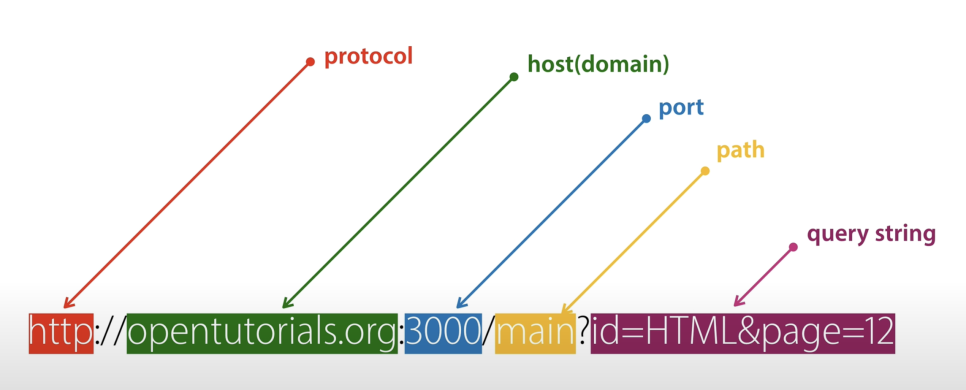
- Protocol : The communication rules made so web browsers and web servers can exchange data. It tells you the communication happens over http.
- Host(domain) : Each computer connected to the internet. It gives the address pointing to a computer connected to a particular internet.
- Port : There can be several servers inside one computer. It's an identifier that tells which server to talk to when a client connects. In the picture, it connects to port 3000. If the port is 80, you don't have to type the port number. The whole world agreed that web servers use port 80, so when we connect over http it's certain we're connecting through a web server, which is why the port number can be omitted.
- Path : Tells you which file in which directory inside the computer.
- Query String : By changing the value of the qeury string you can pass data to the web server. For example, something like 'the info I want to read is html and it's page 12'. It has to start with ?, values are separated from each other by &, and a value's name and the value are separated by =.
Analyzing the server code
var http = require('http');
var fs = require('fs');
var url = require('url');

var app = http.createServer(function(request,response){
    var _url = request.url;
    var queryData = url.parse(_url, true).query;
    var title = queryData.page;

    if(_url === `/`) {
        title = 'Welcome';
    }
    if(_url === '/favicon.ico'){
        return response.writeHead(404);
    }
    var template = `<!doctype html>
<html>
<head>
  <title>WEB1 - ${title}</title>
  <meta charset="utf-8">
</head>
<body>
  <h1><a href="/">WEB</a></h1>
  <ol>
    <li><a href="/?page=HTML">HTML</a></li>
    <li><a href="/?page=CSS">CSS</a></li>
    <li><a href="/?page=JavaScript">JavaScript</a></li>
  </ol>
  <h2>${title}</h2>
  <p><a href="https://www.w3.org/TR/html5/" target="_blank" title="html5 speicification">Hypertext Markup Language (HTML)</a> is the standard markup language for <strong>creating <u>web</u> pages</strong> and web applications.Web browsers receive HTML documents from a web server or from local storage and render them into multimedia web pages. HTML describes the structure of a web page semantically and originally included cues for the appearance of the document.
  <img src="coding.jpg" width="100%">
  </p><p style="margin-top:45px;">HTML elements are the building blocks of HTML pages. With HTML constructs, images and other objects, such as interactive forms, may be embedded into the rendered page. It provides a means to create structured documents by denoting structural semantics for text such as headings, paragraphs, lists, links, quotes and other items. HTML elements are delineated by tags, written using angle brackets.
  </p>
</body>
</html>
`;

    response.writeHead(200);
    response.end(template);
});
app.listen(3000);
- require('module') : Loads the module with the given string name
- request.url : Returns the URL's query string as a string. It always starts with /, though.
- url.parse(request.url, true).query : Returns a type called parsedUrlQuery. I'm not sure exactly what type it is, but when you split the query string's values into key and value, it seems to hold a local variable named key. So you can get the value back with .key after it.
- if (_url ===
/) : Uses the fact that request.url always starts with / to check the case to run when request.url is empty - response.end(info) : Seems to print info to the screen.
- fs.readFileSync(__dirname + _url) : If you load and read a file and put it into response.end, you can print it out.