In part 2 I set up my home server to send alerts to my phone when something goes wrong. But in the military I won't have time to fix things even when I see the alert. So I made it so that when an alert comes in, an AI gets into the server, fixes it, and just sends me the result.
For the AI to fix things, problems have to be noticed in the first place. If I designed the monitoring on gut feeling I'd probably leave gaps, so I started by looking up how the industry does server monitoring. Three principles came up again and again.
The most basic one is to look from both inside and outside. The monitoring chapter of Google's SRE book separates white-box monitoring, which looks at metrics inside the system, from black-box monitoring, which checks externally visible behavior the way a user would see it. White-box catches problems that are about to happen, and black-box catches what is actually broken right now. Google says it makes heavy use of white-box monitoring and modest but critical use of black-box.
You also need to check that the monitoring itself is alive. When the watcher stops, the alerts stop with it, and no alerts looks just like everything being fine. So you use a heartbeat that sends a signal on a schedule and alerts when the signal stops. The Healthchecks.io docs explain that this catches even the whole machine going down, from a power cut or a hardware failure. The Prometheus Operator's Watchdog alert works the same way. It is always firing on purpose, and an outside system notices when it stops.
And the watcher should live somewhere other than what it watches. Prometheus training material explains that a server monitoring itself is brittle, because whatever breaks it breaks the monitoring too. It recommends a separate server whose only job is monitoring.
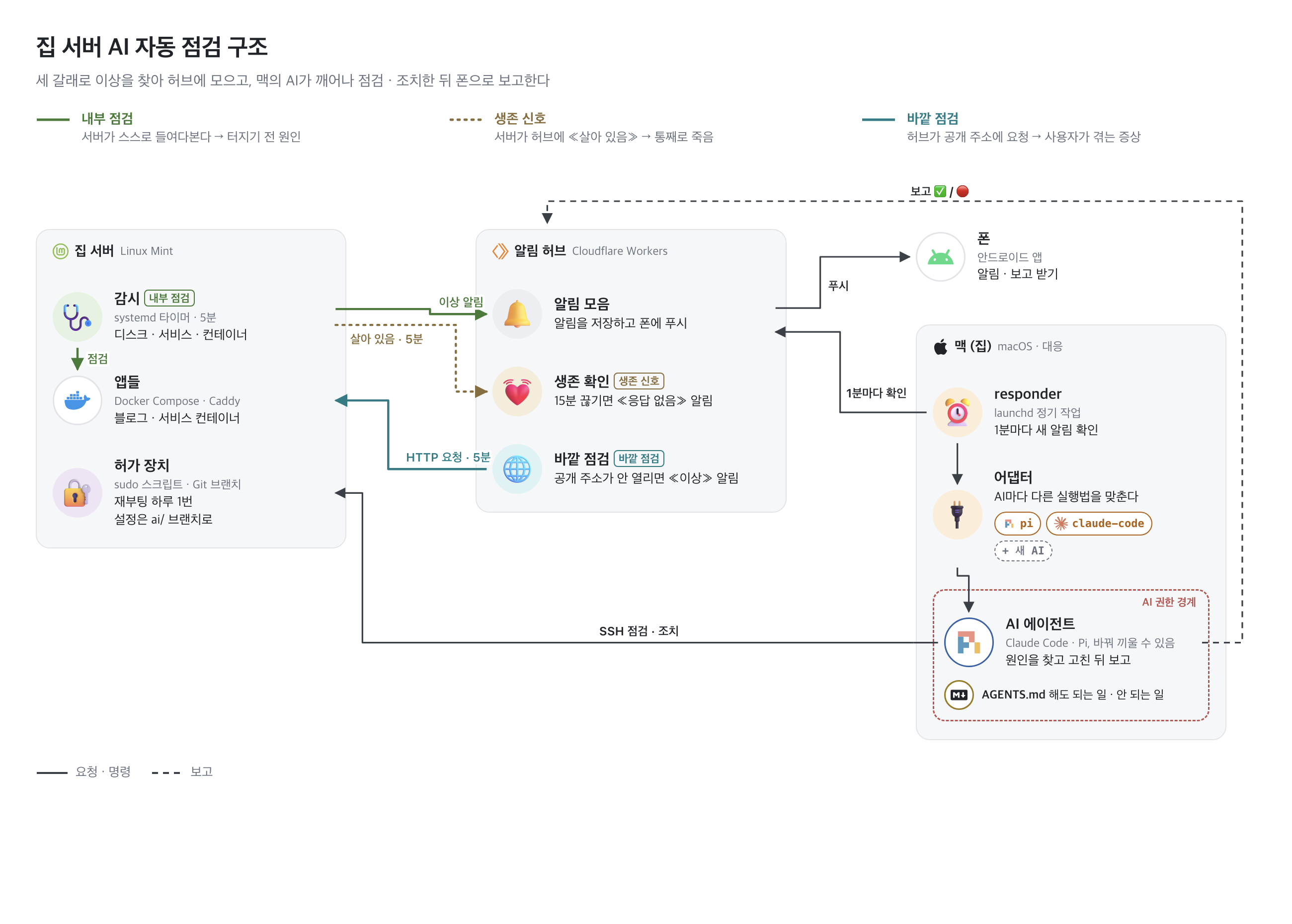
I split my monitoring into three parts to match.
Internal check
This is the white-box part. Inside the server, a systemd timer runs a watch script every 5 minutes. It checks whether the disk is over 85% full, whether free memory is under 1GB, and whether the main services and containers are up. It also looks at SSD health, temperature, fan speed and link speed. It only sends an alert to the hub when a problem appears or clears.
Containers are judged by their restart policy, not their exit code. A container started with unless-stopped or always should always be running, so it counts as a problem however it stopped.
Heartbeat
This is the heartbeat. The same watch script sends the hub an "I'm alive" signal every 5 minutes. If none arrives for 15 minutes, the hub sends a no-response alert. This catches cases where the server can't report anything itself, like a power cut, a lost internet connection or a frozen server. It also catches the watch script itself stopping.
Outside check
This is the black-box part. Every 5 minutes the hub opens 10 public addresses directly, the way a user would. If the domain, the certificate, the router or Caddy goes wrong, things can look fine inside the server while users can't open the site. This is where that gets caught. If a request fails it tries once more 5 seconds later, and it only alerts when an address stops opening or starts opening again.
With the heartbeat, the server sends and the hub waits. With the outside check, the hub goes to the server. The hub runs on Cloudflare Workers, so it doesn't go down with the home server.
When an alert comes in
For the same reason, the AI that does the fixing runs on the Mac at home, not on the server. On the Mac, launchd asks the hub for new alerts every minute. Alerts sometimes come in a burst, like right after a reboot, so it waits 90 seconds after the last one and hands them over together. There's also a cap on runs per hour, and past that it only sends an alert for a person to look at.
Launching the AI is split into one file per AI. Right now there are files for Claude Code and Pi, and using a different AI just means adding one more file. The AI SSHes into the server, reads the logs and looks for the cause. What it may do is written in AGENTS.md in the server repo. It restarts a stopped container right away, it never deletes data, and it can reboot at most once a day. After a fix it runs the same check again to see whether the problem cleared, then sends the result to my phone.
Testing
I broke things on purpose to see whether the three checks actually catch problems.
First I stopped the blog's comment server container with docker stop. At first, no alert came even after 20 minutes. A container stopped with docker stop exits with code 0, and the watch script counted a container that exited with code 0 as fine. Docker doesn't restart a container that a person stopped, either. The restart-policy rule above is what I changed after seeing this.
After the fix I stopped it again. The internal check alerted after 4 minutes and the outside check after 5. The AI restarted the container and checked that it opened both from inside the server and from outside. The recovery report reached my phone 9 minutes after the stop.
I also cut the server's network for 30 minutes. That's the situation where the server can't send anything, like a power cut or a line failure. 13 minutes later the hub sent a no-response alert. The AI confirmed it couldn't connect to the server and reported that it couldn't do anything remotely. When the network came back after 30 minutes, a recovery alert arrived.